Load your code/document, and make sure the filetype is what you what. (use :set to see what filetype is set to).
Turn indent on, and then do "gg=G".
For example, to autoformat a xml file.
1) :set filetype=xml
2) :filetype indent on
3) gg=G
December 10, 2009

December 8, 2009
Linux command to find which dynamic library defines the function getaddrinfo
find /lib /usr/lib -name '*.so*' -exec nm --dynamic --demangle --defined-only --print-file-name {} \; | grep getaddrinfo
busybox root bootstrap
echo root:x:0:0:root:/root:/bin/sh > /etc/passwd
chmod 755 /etc/passwd
touch /etc/shadow

now run login -f root, then you can use adduser to add other users
December 7, 2009
public DNS server

- Google (Unfiltered)
- 8.8.4.4
- 8.8.8.8
- Global Cyber Alliance (Filters malicious content)
- 9.9.9.9
- Cloudflare
- 1.0.0.1
- 1.1.1.1
- Level 3 Communications
- 4.2.2.1
- 4.2.2.2
- 4.2.2.3
- 4.2.2.4
- 4.2.2.5
- 4.2.2.6
Courtesy: http://radoff.com/blog/2009/12/07/google-dns-benchmarking-and-rationale/
December 2, 2009
development environment of VS2008 Express
To Get started using command line, do this:
1. Copy file c:\program files\Visual Studio 9.0\common7\tools\vsvars32.bat to your directory such as c:\tools
2. run c:\tools\vsvars32. This sets up the environment variables, most importantly $PATH
3. use "vcbuild" to build VC project or solutions. You can also use "msbuild" which is want vcbuild calls.
1. Copy file c:\program files\Visual Studio 9.0\common7\tools\vsvars32.bat to your directory such as c:\tools
2. run c:\tools\vsvars32. This sets up the environment variables, most importantly $PATH
3. use "vcbuild" to build VC project or solutions. You can also use "msbuild" which is want vcbuild calls.
VCBUILD Command Line
The VCBUILD tool uses the following command line syntax to build Visual C++ projects and solutions.
VCBUILD [options] [project | solution] [config | $ALL]  Flags
Flags
options
Build options. For more information, see VCBUILD Options.
VCBUILD also reads options from the VCBUILD_DEFAULT_OPTIONS environment variable.
project
The name of a project file.
If the project parameter is not specified and only one .vcproj file is in the directory, the project specified by the .vcproj file is built.
solution
The name of a solution file.
config
The name of a project configuration to build; for example, DEBUG.
If no configuration is specified, and the VCBUILD_DEFAULT_CFG environment variable is set, the configuration it specifies is built. If it is not set, all configurations are built.
$ALL
A symbolic name that means build all configurations.
Remarks
To cancel the build process, press CTRL+C or CTRL+BREAK.
VCBUILD Options
VCBUILD has the following options:
| Option | Description |
| Specifies outputting only clean build outputs. | |
| Specifies prefixing error lines that are outputted to stdin, stdout, stderr with the string argument. | |
| Specifies creating an import library for a DLL configuration. | |
| Specifies prefixing information lines that are outputted to stdin, stdout, stderr with the string argument. | |
| Specifies performing a link without building sources. | |
| Specifies using file as the build log. | |
| Specifies printing commands and response file to the screen. | |
| Specifies the number of concurrent builds to run. | |
| Displays error and warning messages without colorization. | |
| Specifies not generating an import library. | |
| Specifies that .NET Framework 3.5 will be used for all assembly references when upgrading a CLR project from a previous version of Visual Studio. | |
| Specifies performing pass 0 (MIDL) of Build.exe. | |
| Specifies performing pass 1 (compile) of Build.exe (implies /implib). | |
| Specifies to perform pass 2 (link) of Build.exe (implies /noimplib). | |
| Only builds configurations for the given platform. | |
| Specifies cleaning build outputs and then performs a build. | |
| Logs the time it takes to complete the build. | |
| Upgrades the project file to the latest supported format. | |
| Uses the environment variables for PATH, INCLUDE, LIBS, and LIBPATH. | |
| Prefixes warning lines with a user-defined string. |
November 10, 2009
Use objdump to do library depency check
Generally, things that are trying to determine shared library
dependencies should use something like objdump, not ldd:

objdump -p $f | awk '/ NEEDED / { print $2 }'
November 6, 2009
bash history autocomplete
Add the following to your .bashrc file.
# make bash autocomplete with up arrow
  bind '"\e[A":history-search-backward'
  bind '"\e[B":history-search-forward'
A good tcp serial port server on Linux: remserial
This Linux Serial port (RS232) server is simple and works great. check it out.
remserial at http://lpccomp.bc.ca/remserial/
Another good one is ser2net. Project page in source forge:
http://ser2net.sourceforge.net/
Yet another one: serproxy at http://www.lspace.nildram.co.uk/freeware.html
this one supports Windows too.
remserial at http://lpccomp.bc.ca/remserial/
Another good one is ser2net. Project page in source forge:
http://ser2net.sourceforge.net/
Yet another one: serproxy at http://www.lspace.nildram.co.uk/freeware.html
this one supports Windows too.
November 4, 2009
Linux process view: top and htop
htop is a nice program to view linux processes, an alternative and simpler top.
http://htop.sourceforge.net/

http://htop.sourceforge.net/

November 3, 2009
Fix IP Phone for Gizmo
You may want to test first by dialing *0# and you will get one of two recordings.
1. You are behind the router that uses a NAT. You may experience call completion problems behind this router:
2. You are behind the SIP compatible router. You are now ready to make free world-wide calls to other SIP phones...:
From Boatman on the Gizmo forum: Suggested settings for ATAs behind one or more NAT routers.
(under SIP tab)
Handle_VIA_received: yes
Handle_VIA_rport: yes
Insert_VIA_received: yes
Insert_VIA_rport: yes
Substitute_VIA_Addr: yes
Send_Resp_To_Src_Port: yes
STUN_Enable: yes
STUN_Server: stun01.sipphone.com:3478
NAT_Keep_Alive_Intvl: 179
(under Line_1 and Line_2 tabs)
NAT_Mapping_Enable: yes
NAT_Keep_Alive_Enable: yes
NAT_Keep_Alive_Msg: 0000 <-- sometimes just leaving this blank works
NAT_Keep_Alive_Dest: $PROXY
Register Expires: 3600
Sometimes it's preferable to configure the ATA to work without stun. This optional configuration is less easily
portable but allows phone service to continue no matter if the stun server is working.
If you want to do this perform the following steps.
1. Forward the SIP ports and the RTP port range from the router to the ATA.
2. Set "STUN Enable:" no
3. Set "NAT Keep Alive Enable:" no
4. In order for the ATA to know it's public IP address, make sure the ATA is registered with at least one SIP registrar, or enter your public IP address in "EXT IP:".
When done dial *0 or *0# to check that your RTP contact address is correct.
Src: http://www.google.com/support/forum/p/voice/thread?tid=68aac21378df83fc&hl=en
1. You are behind the router that uses a NAT. You may experience call completion problems behind this router:
2. You are behind the SIP compatible router. You are now ready to make free world-wide calls to other SIP phones...:
From Boatman on the Gizmo forum: Suggested settings for ATAs behind one or more NAT routers.
(under SIP tab)
Handle_VIA_received: yes
Handle_VIA_rport: yes
Insert_VIA_received: yes
Insert_VIA_rport: yes
Substitute_VIA_Addr: yes
Send_Resp_To_Src_Port: yes
STUN_Enable: yes
STUN_Server: stun01.sipphone.com:3478
NAT_Keep_Alive_Intvl: 179
(under Line_1 and Line_2 tabs)
NAT_Mapping_Enable: yes
NAT_Keep_Alive_Enable: yes
NAT_Keep_Alive_Msg: 0000 <-- sometimes just leaving this blank works
NAT_Keep_Alive_Dest: $PROXY
Register Expires: 3600
Sometimes it's preferable to configure the ATA to work without stun. This optional configuration is less easily
portable but allows phone service to continue no matter if the stun server is working.
If you want to do this perform the following steps.
1. Forward the SIP ports and the RTP port range from the router to the ATA.
2. Set "STUN Enable:" no
3. Set "NAT Keep Alive Enable:" no
4. In order for the ATA to know it's public IP address, make sure the ATA is registered with at least one SIP registrar, or enter your public IP address in "EXT IP:".
When done dial *0 or *0# to check that your RTP contact address is correct.
Src: http://www.google.com/support/forum/p/voice/thread?tid=68aac21378df83fc&hl=en
October 15, 2009
Understand Linux /proc/meminfo
>MemTotal: 123748 kB
Total memory available to the memory manager (i.e. guest size minus some
fixed amount used for the kernel image itself and some boot-time allocated
memory).
>MemFree: 9864 kB
Memory currently not allocated to any use by the MM. (This figure should
generally be low, because except for a small emergency reserve Linux tends
to always put all available memory to some use ...)
>Buffers: 38572 kB
>Cached: 30692 kB
Memory currently allocated to hold data backed by files. This included
pages currently memory-mapped as well as pages still cached from recent
accesses. The distinction between 'buffers' and 'cached' is becoming more
and more pointless; as a rule of thumb you can say file meta-data (e.g.
inodes, directories, indirect lists, ...) count as 'buffers', while the
actual file 'payload' data counts as 'cached'.
>SwapCached: 1196 kB
Similar to the above, but refers to anonymous memory that has already been
allocated a swap slot, but is currently present in memory anyway (because
it is still in the process of being swapped out, or because it is still
being cached on swap after having been swapped in).
>Active: 70428 kB
>Inactive: 15916 kB
The sum of these two corresponds to all memory under control of the page
replacement algorithm (i.e. anonymous pages plus page/swap cache ('buffers'
+ 'cached' + 'swap cache')). The distinction active vs. inactive refers to
the method the page replacement algorithm uses to decide when to swap pages
out; the basic idea is that a page goes from 'active' to 'inactive' state
after it hasn't been used for some time, and if an 'inactive' page
continues to remain unused from some more time, it'll get swapped out.
>HighTotal: 0 kB
>HighFree: 0 kB
This refers to 'high memory', which isn't used on zSeries.
>LowTotal: 123748 kB
>LowFree: 9864 kB
This is equivalent to MemTotal/MemFree as we don't have 'high memory' on
zSeries.
>SwapTotal: 50296 kB
Total size of all currently active swap devices/files.
>SwapFree: 37820 kB
Currently unused swap space.
>Dirty: 324 kB
Among the active/inactive pages, how many are 'dirty' (i.e. would need to
be paged out before they can be reused for other purposes).
>Writeback: 0 kB
Among the active/inactive pages, how many are currently in the process of
being written out to swap / backing store.
>Mapped: 35128 kB
Pages currenly mapped into user space (included both anonymous memory and
memory-mapped files).
>Slab: 15044 kB
Pages used by the kernel memory pool ('slab') allocator. For details about
slab pool allocation, see /proc/slabinfo
>Committed_AS: 224580 kB
Total user address space used by memory mappings. This is the amount of
memory you would need if all anonymous memory and memory-mapped files in
all user processes were present in memory at the same time, nothing swapped
out or still resident on backing store.
>PageTables: 1348 kB
Memory used by the kernel to hold (hardware) page tables.
>VmallocTotal: 1957887 kB
Total address space range available to the kernel's vmalloc area. This is
a region in the kernel address space used by the kernel to allocate large
areas of kernel memory that need not be backed by physically contiguous
pages. It is used e.g. for loadable kernel modules.
>VmallocUsed: 5848 kB
Portion of the vmalloc area that is currently used.
>VmallocChunk: 1951975 kB
Largest single contiguous chunk of address space currently available in the
vmalloc area.
Total memory available to the memory manager (i.e. guest size minus some
fixed amount used for the kernel image itself and some boot-time allocated
memory).
>MemFree: 9864 kB
Memory currently not allocated to any use by the MM. (This figure should
generally be low, because except for a small emergency reserve Linux tends
to always put all available memory to some use ...)
>Buffers: 38572 kB
>Cached: 30692 kB
Memory currently allocated to hold data backed by files. This included
pages currently memory-mapped as well as pages still cached from recent
accesses. The distinction between 'buffers' and 'cached' is becoming more
and more pointless; as a rule of thumb you can say file meta-data (e.g.
inodes, directories, indirect lists, ...) count as 'buffers', while the
actual file 'payload' data counts as 'cached'.
>SwapCached: 1196 kB
Similar to the above, but refers to anonymous memory that has already been
allocated a swap slot, but is currently present in memory anyway (because
it is still in the process of being swapped out, or because it is still
being cached on swap after having been swapped in).
>Active: 70428 kB
>Inactive: 15916 kB
The sum of these two corresponds to all memory under control of the page
replacement algorithm (i.e. anonymous pages plus page/swap cache ('buffers'
+ 'cached' + 'swap cache')). The distinction active vs. inactive refers to
the method the page replacement algorithm uses to decide when to swap pages
out; the basic idea is that a page goes from 'active' to 'inactive' state
after it hasn't been used for some time, and if an 'inactive' page
continues to remain unused from some more time, it'll get swapped out.
>HighTotal: 0 kB
>HighFree: 0 kB
This refers to 'high memory', which isn't used on zSeries.
>LowTotal: 123748 kB
>LowFree: 9864 kB
This is equivalent to MemTotal/MemFree as we don't have 'high memory' on
zSeries.
>SwapTotal: 50296 kB
Total size of all currently active swap devices/files.
>SwapFree: 37820 kB
Currently unused swap space.
>Dirty: 324 kB
Among the active/inactive pages, how many are 'dirty' (i.e. would need to
be paged out before they can be reused for other purposes).
>Writeback: 0 kB
Among the active/inactive pages, how many are currently in the process of
being written out to swap / backing store.
>Mapped: 35128 kB
Pages currenly mapped into user space (included both anonymous memory and
memory-mapped files).
>Slab: 15044 kB
Pages used by the kernel memory pool ('slab') allocator. For details about
slab pool allocation, see /proc/slabinfo
>Committed_AS: 224580 kB
Total user address space used by memory mappings. This is the amount of
memory you would need if all anonymous memory and memory-mapped files in
all user processes were present in memory at the same time, nothing swapped
out or still resident on backing store.
>PageTables: 1348 kB
Memory used by the kernel to hold (hardware) page tables.
>VmallocTotal: 1957887 kB
Total address space range available to the kernel's vmalloc area. This is
a region in the kernel address space used by the kernel to allocate large
areas of kernel memory that need not be backed by physically contiguous
pages. It is used e.g. for loadable kernel modules.
>VmallocUsed: 5848 kB
Portion of the vmalloc area that is currently used.
>VmallocChunk: 1951975 kB
Largest single contiguous chunk of address space currently available in the
vmalloc area.
October 13, 2009
The list of linux compatible (native driver, not ndis driver) usb wireless sticks
The list of linux compatible (native driver, not ndis driver) usb wireless sticks:
http://linuxwireless.org/en/users/Devices/USB
The ones available to purchase from bestbuy or Frys:
Bestbuy:
p54usb Belkin F5D7050 ver 1000 0x0707 0xee06
ar9170 Netgear WNDA3100 0x0846 0x9010
Frys:
p54usb Netgear WG111 0x0846 0x4220
zd1211rw Belkin F5D7050 v.4000 050d 705c
zd1211rw Linksys WUSBF54G 13b1 001e
zd1211rw Linksys WUSBF54G 13b1 0024
zd1211rw MyEssentials G USB Adapter 050d 705c
ar9170 Netgear WN111 v2 0x0846 0x9001
September 28, 2009
gawk command to telnet into a tcp server and issue a command
#!/usr/bin/gawk -f
BEGIN{
cmd="/inet/tcp/0/127.0.0.1/1800";
printf("showconfig\n") |& cmd;
printf("bye\n") |& cmd;
while ( (cmd |& getline) >0){
print $0;
}
close(cmd);
}
BEGIN{
cmd="/inet/tcp/0/127.0.0.1/1800";
printf("showconfig\n") |& cmd;
printf("bye\n") |& cmd;
while ( (cmd |& getline) >0){
print $0;
}
close(cmd);
}
September 14, 2009
awk binary editing
Gawk is powerful. Learn it when you are young!
To use awk to edit a binary file, you can simply do this:
gawk -F "" 'BEGIN{RS="/nuclear power is good/"}{printf("%s",substr($0,1,5) "\x81" substr($0,7))}' 1.out > aa
-F"" tells awk to treat every character as a field
RS="/nuclear power is good/" tells awk to use this string as the row/record separator. Since this string does not exist in your binary file (if by a weird chance it does, change it to another random string), awk will treat all file as one single record.
Now you have the entire binary file as a string in $0, just use your string functions to do substitutions and changes. In the example above, I changed the character at offset 6 to hex 0x81.
Is this wonderful?
To use awk to edit a binary file, you can simply do this:
gawk -F "" 'BEGIN{RS="/nuclear power is good/"}{printf("%s",substr($0,1,5) "\x81" substr($0,7))}' 1.out > aa
-F"" tells awk to treat every character as a field
RS="/nuclear power is good/" tells awk to use this string as the row/record separator. Since this string does not exist in your binary file (if by a weird chance it does, change it to another random string), awk will treat all file as one single record.
Now you have the entire binary file as a string in $0, just use your string functions to do substitutions and changes. In the example above, I changed the character at offset 6 to hex 0x81.
Is this wonderful?
September 10, 2009
awk script for processing comma seperated files
This script remove leading and trailing spaces of each line,
and the field separator is any amount of space, tab mixed with one comma (of course you can also use = or other symbols).
#!/usr/bin/awk -f
BEGIN{
FS=" *, *"
}
{
gsub(/^[ \t]+|[ \t]+$/, "");
printf("|%s|\n",$1);
printf("|%s|\n",$2);
print "===="
}
and the field separator is any amount of space, tab mixed with one comma (of course you can also use = or other symbols).
#!/usr/bin/awk -f
BEGIN{
FS=" *, *"
}
{
gsub(/^[ \t]+|[ \t]+$/, "");
printf("|%s|\n",$1);
printf("|%s|\n",$2);
print "===="
}
August 31, 2009
unbrick TEW-652BRP router
TEW-652BRP is one of the cheapest 11N wireless routers (availabe around $30). It can be flashed with Dlink DIR-615 firmware and openwrt firmware.
The bootloader is u-boot, and it has a built-in web server for firmware upgrade. To unbrick/upgrade, following these steps:
1. unplug power
2. hold reset button using a pin
3. plug power back while holding the reset button
4. wait around 20-30s.
5. You should see the STATUS LED (the one next to power) blink slowly. This is the indication that the device is in u-boot web server mode
6. Set your PC IP address to 192.168.0.2. The router IP address is 192.168.0.1
7. Browse to 192.168.0.1, upload the firmware. The firmware is required to use dlink hardware ID (ending with .2)
8. Wait until it is 100% finished (indicated on the screen), and then wait another 30s, and repower the router (it does NOT reboot automatically).
9. That's it. The default Dlink firmware IP address is 192.168.10.1
The bootloader is u-boot, and it has a built-in web server for firmware upgrade. To unbrick/upgrade, following these steps:
1. unplug power
2. hold reset button using a pin
3. plug power back while holding the reset button
4. wait around 20-30s.
5. You should see the STATUS LED (the one next to power) blink slowly. This is the indication that the device is in u-boot web server mode
6. Set your PC IP address to 192.168.0.2. The router IP address is 192.168.0.1
7. Browse to 192.168.0.1, upload the firmware. The firmware is required to use dlink hardware ID (ending with .2)
8. Wait until it is 100% finished (indicated on the screen), and then wait another 30s, and repower the router (it does NOT reboot automatically).
9. That's it. The default Dlink firmware IP address is 192.168.10.1
August 25, 2009
trace inter-process communication
"strace" and "lsof" are two very powerful tools to debug running processes in a Linux system.
Use "lsof -p PID" to find out the socket/fifos a process is using
Use "lsof -p PID -Pn" to have lsof show ip and port number instead of names
Use [ strace -p 24846 -ewrite,read -s 1024 -xx 2>&1 | grep -E "^write\(7|^read\(6" ] to trace the real-time read/write of the process
Use "lsof -p PID" to find out the socket/fifos a process is using
Use "lsof -p PID -Pn" to have lsof show ip and port number instead of names
Use [ strace -p 24846 -ewrite,read -s 1024 -xx 2>&1 | grep -E "^write\(7|^read\(6" ] to trace the real-time read/write of the process
August 14, 2009
Set the sort order of file open dialog
Set the order you wish to see using Windows Explorer, hold Ctrl and press
the Close button on the window. The sorting order for the Open/Save dialog
should be changed :-)
I wish this is documented somewhere by the guys in Redmond.
the Close button on the window. The sorting order for the Open/Save dialog
should be changed :-)
I wish this is documented somewhere by the guys in Redmond.
August 5, 2009
ASUS Restore firmware /unbrick
ASUS WL-500gP V2 is a great router. One of good things is you can always unbrick it.
To unbrick it. unplug it, hold on the "restore" button, plug power, and wait for 5 seconds, the power LED should go into slow blinking. This shows that the box is in recovery mode.
Connect a PC to a LAN port, and make sure you disable all other network connections on the PC you are using to flash. This is the key!!
Set you PC Ethernet IP to 192.168.1.5/255.255.255.0. You will NOT be able to ping 192.168.1.1. That is OKAY.
Now fire up the ASUS Firmware Restoration utility (came with your box in the CD or downloadable from ASUS website in Utilties), and load the firmware.
Regardless whether your firmware is good or bad, you can always use this method to reflash the box.
DD-WRT sets the NVRAM password. I had to restore the firmware to ASUS firmware and press RESTORE button for more than 10 seconds, and reboot to erase the NVRAM password. Then I reflash my box to tomato firware.
To unbrick it. unplug it, hold on the "restore" button, plug power, and wait for 5 seconds, the power LED should go into slow blinking. This shows that the box is in recovery mode.
Connect a PC to a LAN port, and make sure you disable all other network connections on the PC you are using to flash. This is the key!!
Set you PC Ethernet IP to 192.168.1.5/255.255.255.0. You will NOT be able to ping 192.168.1.1. That is OKAY.
Now fire up the ASUS Firmware Restoration utility (came with your box in the CD or downloadable from ASUS website in Utilties), and load the firmware.
Regardless whether your firmware is good or bad, you can always use this method to reflash the box.
DD-WRT sets the NVRAM password. I had to restore the firmware to ASUS firmware and press RESTORE button for more than 10 seconds, and reboot to erase the NVRAM password. Then I reflash my box to tomato firware.
VMWare Player hidden vmnetcfg
2/28/2003 Update:
In VMWare Player 5 you need to:
go to the vmware-directory and run in elevated cmd.exe-box
rundll32.exe vmnetui.dll VMNetUI_ShowStandalone
http://communities.vmware.com/message/2155960#2155960
Original Post:
I like VMWare player for its stability but wanted to have more control on the network configuration. For example, I wanted to configure which physical network card to map to the bridged network in vmware player. I dug around the internet but did not find any. Fortunately when scanning through the EXE files installed by VMWare Player I found what I was looking for: vmnetcfg.exe.
So simply go to the following directory in your Windows and run "vmnetcfg"
C:\Program Files\VMware\VMware Player>vmnetcfg
And you should see a window popping up where you can configured all network configurations.
I think the configurations are saved to somewhere in the registry. After changing my bridged network map, and rebooted my virtual Linux, the bridged network worked great.
You can also changed DHCP settings, NAT settings (port forwarding on both TCP and UDP), and all kinds of other interesting things. Be sure to check it out if you use vmware player.
This is the screenshot: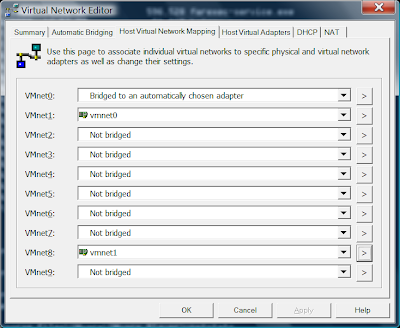
In VMWare Player 5 you need to:
go to the vmware-directory and run in elevated cmd.exe-box
rundll32.exe vmnetui.dll VMNetUI_ShowStandalone
http://communities.vmware.com/message/2155960#2155960
Original Post:
I like VMWare player for its stability but wanted to have more control on the network configuration. For example, I wanted to configure which physical network card to map to the bridged network in vmware player. I dug around the internet but did not find any. Fortunately when scanning through the EXE files installed by VMWare Player I found what I was looking for: vmnetcfg.exe.
So simply go to the following directory in your Windows and run "vmnetcfg"
C:\Program Files\VMware\VMware Player>vmnetcfg
And you should see a window popping up where you can configured all network configurations.
I think the configurations are saved to somewhere in the registry. After changing my bridged network map, and rebooted my virtual Linux, the bridged network worked great.
You can also changed DHCP settings, NAT settings (port forwarding on both TCP and UDP), and all kinds of other interesting things. Be sure to check it out if you use vmware player.
This is the screenshot:

Subscribe to:
Posts (Atom)